Discover how menu management software helps restaurants organize food items, categories, prices, variations and add-ons. Learn essential features and benefits for restaurants, cafes, bakeries and cloud kitchens.
In this article
- What Is Menu Management Software?
- Why Is Menu Management Important for Restaurants?
- Essential Features of Menu Management Software
- 1. Food Category Management
- 2. Food Item Management
- 3. Menu Pricing Management
- 4. Food Variations Management
- 5. Add-ons and Modifiers
- 6. Food Images and Descriptions
- 7. Item Availability Management
- 8. Multiple Menu Management
- How Menu Management Software Works with Restaurant POS
- Benefits of Digital Menu Management for Restaurants
- Who Needs Menu Management Software?
- Restaurants
- Cafes and Coffee Shops
- Cloud Kitchens
- Bakeries
- Fast Food Businesses
- How to Create an Effective Restaurant Menu
- Common Menu Management Mistakes to Avoid
- 1. Incorrect Food Prices
- 2. Poor Category Organization
- 3. Missing Food Variations
- 4. Duplicate Menu Items
- 5. Outdated Menu Availability
- How EasyBillMatic Helps Restaurants Manage Menus
- Frequently Asked Questions
- 1. What is menu management software?
- 2. Why do restaurants need menu management software?
- 3. Can menu management software manage food variations?
- 4. What are menu modifiers?
- 5. Can restaurant menus connect with POS billing?
- 6. Can I update food prices using menu management software?
- 7. Is menu management software useful for small cafes?
- Conclusion
Menu management software helps restaurants, cafes, hotels, and food businesses organize food items, categories, prices, variations, and availability in one place. Instead of managing menus manually, restaurant owners can use a digital system to maintain accurate menu information and simplify daily order management.
Whether you operate a restaurant, cafe, bakery, cloud kitchen, or food outlet, an organized digital menu can improve order processing and make menu updates easier.
What Is Menu Management Software?
Menu management software is a digital solution that allows food businesses to create, organize, update, and manage their menus. It helps restaurant owners maintain food item names, descriptions, categories, prices, variations, and other menu information.
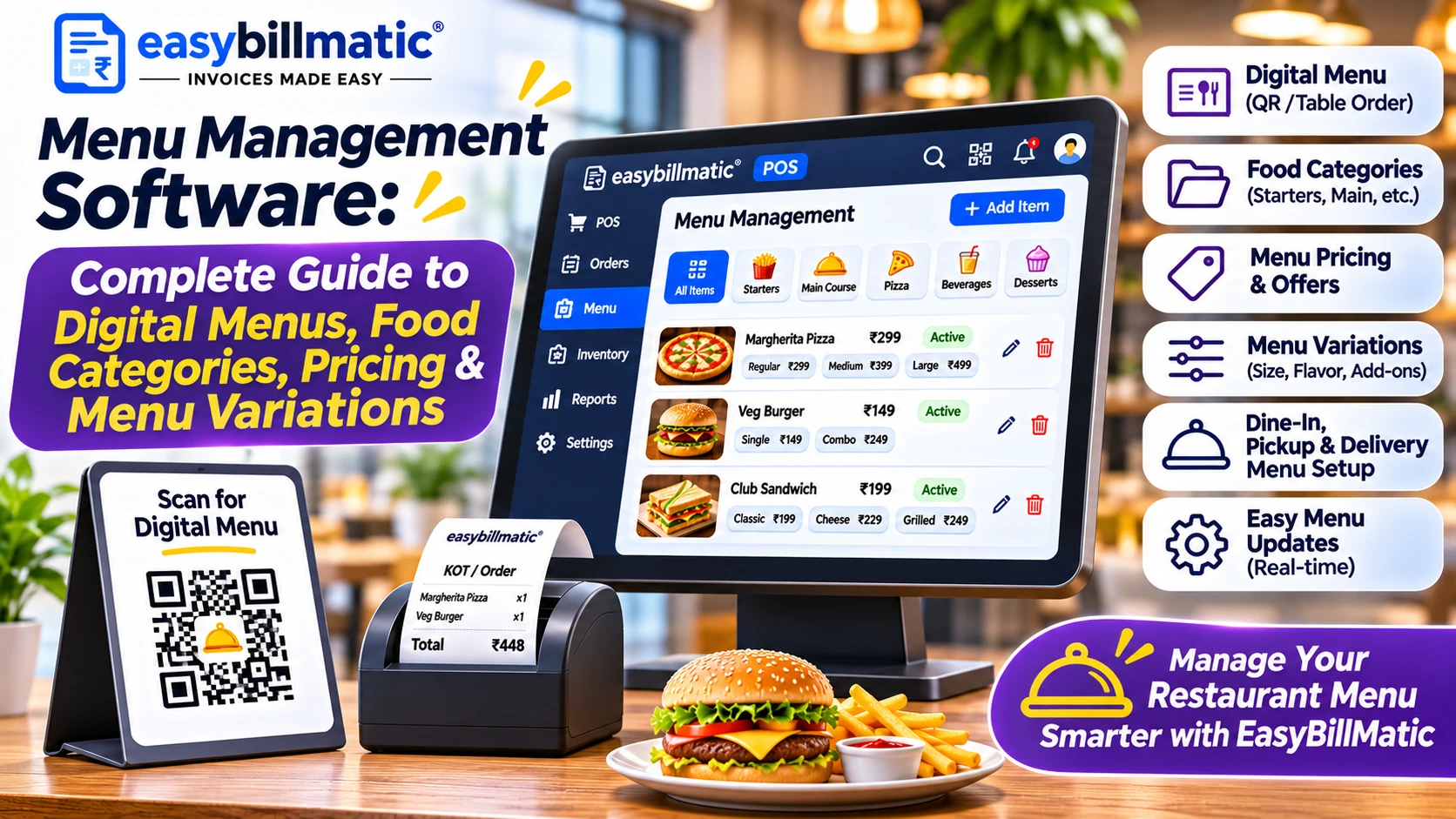
For example, a restaurant may offer different categories such as Starters, Main Course, Pizza, Burgers, Beverages, and Desserts. Each category can contain multiple food items with different prices and available variations.
A centralized menu management system makes it easier to organize these items and maintain consistent menu information.
Why Is Menu Management Important for Restaurants?
A restaurant menu is more than a list of food items. It is an important part of order management, pricing, kitchen operations, and customer experience.
Managing a large menu manually can create problems such as outdated prices, duplicate items, incorrect categories, and confusion during order processing.
Digital menu management helps restaurants:
- Organize food items into categories.
- Update item prices more efficiently.
- Manage food variations and add-ons.
- Maintain consistent menu information.
- Control item availability.
- Simplify product selection during billing.
- Reduce manual menu maintenance.
Essential Features of Menu Management Software
1. Food Category Management
Category management helps restaurants organize menu items into logical groups.
Common restaurant menu categories include:
- Starters
- Soups
- Salads
- Chinese Food
- Indian Food
- Pizza and Pasta
- Burgers and Sandwiches
- Beverages
- Desserts
Well-organized categories make it easier for restaurant employees to find items while creating customer orders.
2. Food Item Management
Food item management allows restaurants to maintain individual menu products with relevant information such as item name, description, price, category, and image.
For example, a restaurant can create products such as Paneer Tikka, Veg Biryani, Masala Dosa, Cold Coffee, and Chocolate Brownie.
Organized product information makes menu maintenance and order selection easier.
3. Menu Pricing Management
Food prices can change because of ingredient costs, supplier prices, seasonal demand, and business decisions.
Menu management software helps restaurant owners maintain item prices and update them when necessary.
Restaurants may also need different pricing structures for dine-in, takeaway, and delivery orders, depending on their business model and software capabilities.
4. Food Variations Management
Many restaurants offer the same food item in different sizes, portions, or preparation styles.
For example:
- Regular Pizza and Large Pizza.
- Small Coffee and Large Coffee.
- Half Plate Biryani and Full Plate Biryani.
- Regular Burger and Cheese Burger.
- Small Cold Drink and Large Cold Drink.
A suitable menu management system should support variations so employees can select the correct option and price while creating orders.
5. Add-ons and Modifiers
Add-ons allow customers to customize their food orders by selecting additional ingredients or optional extras.
Examples include:
- Extra Cheese
- Extra Sauce
- Extra Toppings
- Additional Paneer
- Extra Mayonnaise
- Additional Ice Cream
Modifiers can also help restaurants manage preparation preferences, such as spice levels, sweetness, and other customization options.
6. Food Images and Descriptions
Adding food images and descriptions can make menus easier to understand. Customers and employees can identify products more easily when relevant images and clear descriptions are available.
Restaurants should use clear images and accurate descriptions that represent the actual food items being offered.
7. Item Availability Management
Restaurants may run out of ingredients or temporarily stop offering certain dishes. Item availability management helps businesses identify which menu items can currently be ordered.
For example, a restaurant can mark a dish unavailable when ingredients are out of stock, where the software supports availability controls.
8. Multiple Menu Management
Some restaurants operate different menus for breakfast, lunch, dinner, special events, or different business locations.
Multiple menu management can help businesses organize these menus according to their operating requirements.
How Menu Management Software Works with Restaurant POS
Menu management becomes more useful when connected with restaurant POS billing and order management.
A typical workflow includes:
- Create Categories: Organize food items into appropriate menu categories.
- Add Food Items: Enter item names, descriptions, prices, and other details.
- Configure Variations: Add sizes, portions, or other available options.
- Configure Modifiers: Add optional extras and customization choices.
- Maintain Availability: Update the availability of dishes when required.
- Select Menu Items: Employees select food items while creating customer orders.
- Process Orders: Review selected items, quantities, and prices before confirming the order.
- Manage Kitchen Orders: Use the supported kitchen order workflow to communicate order details to kitchen staff.
Benefits of Digital Menu Management for Restaurants
- Organized Menus: Keep food items and categories structured.
- Easy Price Updates: Maintain current menu prices.
- Better Order Accuracy: Help employees select the correct food items and variations.
- Faster Order Processing: Make products easier to locate during billing.
- Consistent Information: Maintain organized product details.
- Improved Customization: Support food variations and optional add-ons.
- Reduced Manual Work: Simplify repetitive menu maintenance activities.
- Better Restaurant Operations: Connect menu organization with billing and order workflows.
Who Needs Menu Management Software?
Restaurants
Restaurants with large food menus can organize starters, main courses, beverages, desserts, and other items in structured categories.
Cafes and Coffee Shops
Cafes can organize coffee, tea, cold beverages, sandwiches, snacks, and desserts. Variations can help manage different sizes and customization options.
Cloud Kitchens
Cloud kitchens often operate multiple food brands or specialized menus. Digital menu tools can help organize their food catalogs and maintain menu information.
Bakeries
Bakeries can manage cakes, pastries, breads, cookies, and other products with different sizes, flavors, and prices.
Fast Food Businesses
Fast food outlets can organize burgers, pizzas, sandwiches, fries, beverages, combos, and additional toppings for faster order selection.
How to Create an Effective Restaurant Menu
Creating an effective restaurant menu requires more than adding food names and prices. A properly structured menu should be easy to understand and convenient for employees to manage.
- Identify Menu Categories: Divide food items into relevant groups.
- Use Clear Item Names: Choose recognizable names for every dish.
- Set Accurate Prices: Verify item prices before publishing the menu.
- Add Variations: Configure different sizes and portions where applicable.
- Configure Add-ons: Include optional extras and food customization choices.
- Add Descriptions: Explain important ingredients and food characteristics.
- Use Quality Images: Add suitable photographs of food items.
- Review Availability: Keep unavailable dishes updated.
- Test the POS Menu: Check item selection, pricing, variations, and order processing.
Common Menu Management Mistakes to Avoid
1. Incorrect Food Prices
Outdated or incorrect prices can create billing confusion. Review menu prices regularly and ensure the configured prices match your current business requirements.
2. Poor Category Organization
Placing unrelated products in the same category makes menu navigation difficult. Create logical categories and use consistent naming.
3. Missing Food Variations
Restaurants offering multiple sizes or portions should clearly configure those options to avoid confusion during order processing.
4. Duplicate Menu Items
Duplicate products can create confusion for employees and affect menu organization. Review the product catalog and remove unnecessary duplicates.
5. Outdated Menu Availability
Unavailable dishes should be updated promptly to prevent employees from accepting orders for products that cannot be prepared.
How EasyBillMatic Helps Restaurants Manage Menus
EasyBillMatic provides restaurant POS solutions designed to help food businesses organize their menu and daily billing operations.
Restaurant owners can explore menu and POS workflows involving:
- Food item and category organization.
- Product pricing management.
- Food variations and item modifiers.
- Restaurant order creation.
- Dine-in, takeaway, and delivery order workflows.
- Kitchen Order Ticket management.
- Customer billing and receipt printing.
- Restaurant sales management.
Connecting menu organization with POS billing can help restaurants maintain structured food catalogs and simplify everyday order processing.
Explore EasyBillMatic restaurant POS solutions to learn more about digital restaurant management.
Frequently Asked Questions
1. What is menu management software?
Menu management software is a digital solution that helps restaurants create, organize, update, and manage food items, categories, prices, variations, and menu information.
2. Why do restaurants need menu management software?
Restaurants use menu management software to organize food catalogs, maintain prices, configure variations, and simplify menu-related order operations.
3. Can menu management software manage food variations?
Many menu management systems support variations such as different sizes, portions, flavors, and other food options.
4. What are menu modifiers?
Menu modifiers are customization options that allow customers to select additional ingredients, toppings, preparation preferences, or other optional extras.
5. Can restaurant menus connect with POS billing?
Yes. Many restaurant POS systems connect menu items with billing and order management so employees can select food items directly when creating customer orders.
6. Can I update food prices using menu management software?
Suitable menu management systems allow authorized users to update product prices and maintain current menu information.
7. Is menu management software useful for small cafes?
Yes. Small cafes can use digital menu tools to organize beverages, snacks, food items, sizes, and additional customization options.
Conclusion
Menu management is an important part of running an organized restaurant or food business. Managing food categories, item prices, variations, modifiers, and availability through a digital system can simplify everyday operations.
Choosing suitable menu management software can help restaurant owners maintain organized food catalogs and improve the order creation process.
Visit EasyBillMatic to explore restaurant POS solutions for menu management, billing, and order operations.